Github Actionsを使うといろんな作業が自動化できます。また、PHP-CS-Fixerを使うと、PHPのソースコードを定義したフォーマット(コーディング規約)に合わせて整形してくれます。
ということで、今回は、「コミットごとにPHP-CS-Fixerの整形をGithub Actionsで自動化すること」を実現したいと思います。
PHP-CS-Fixerのインストール
まずは導入したいと思います。
composer require friendsofphp/php-cs-fixer --dev だけと簡単ですね。
$ composer require friendsofphp/php-cs-fixer --dev
Using version ^2.16 for friendsofphp/php-cs-fixer
./composer.json has been updated
Loading composer repositories with package information
Updating dependencies (including require-dev)
Package operations: 29 installs, 0 updates, 0 removals
  - Installing psr/container (1.0.0): Downloading (100%)
  - Installing symfony/service-contracts (v2.1.3): Downloading (100%)
  - Installing symfony/stopwatch (v5.1.3): Downloading (100%)
  - Installing symfony/polyfill-php80 (v1.18.0): Downloading (100%)
  - Installing symfony/process (v5.1.3): Downloading (100%)
  - Installing symfony/polyfill-php72 (v1.18.0): Downloading (100%)
  - Installing paragonie/random_compat (v9.99.99): Downloading (100%)
  - Installing symfony/polyfill-php70 (v1.18.0): Downloading (100%)
  - Installing symfony/deprecation-contracts (v2.1.3): Downloading (100%)
  - Installing symfony/options-resolver (v5.1.3): Downloading (100%)
  - Installing symfony/finder (v5.1.3): Downloading (100%)
  - Installing symfony/polyfill-ctype (v1.18.0): Downloading (100%)
  - Installing symfony/filesystem (v5.1.3): Downloading (100%)
  - Installing psr/event-dispatcher (1.0.0): Downloading (100%)
  - Installing symfony/event-dispatcher-contracts (v2.1.3): Downloading (100%)
  - Installing symfony/event-dispatcher (v5.1.3): Downloading (100%)
  - Installing symfony/polyfill-mbstring (v1.18.0): Downloading (100%)
  - Installing symfony/polyfill-intl-normalizer (v1.18.0): Downloading (100%)
  - Installing symfony/polyfill-intl-grapheme (v1.18.0): Downloading (100%)
  - Installing symfony/string (v5.1.3): Downloading (100%)
  - Installing symfony/polyfill-php73 (v1.18.0): Downloading (100%)
  - Installing symfony/console (v5.1.3): Downloading (100%)
  - Installing psr/log (1.1.3): Downloading (100%)
  - Installing php-cs-fixer/diff (v1.3.0): Downloading (100%)
  - Installing doctrine/lexer (1.2.1): Downloading (100%)
  - Installing doctrine/annotations (1.10.3): Downloading (100%)
  - Installing composer/xdebug-handler (1.4.2): Downloading (100%)
  - Installing composer/semver (1.5.1): Downloading (100%)
  - Installing friendsofphp/php-cs-fixer (v2.16.4): Downloading (100%)
symfony/service-contracts suggests installing symfony/service-implementation
paragonie/random_compat suggests installing ext-libsodium (Provides a modern crypto API that can be used to generate random bytes.)
symfony/event-dispatcher suggests installing symfony/dependency-injection
symfony/event-dispatcher suggests installing symfony/http-kernel
symfony/polyfill-intl-normalizer suggests installing ext-intl (For best performance)
symfony/polyfill-intl-grapheme suggests installing ext-intl (For best performance)
symfony/console suggests installing symfony/lock
friendsofphp/php-cs-fixer suggests installing php-cs-fixer/phpunit-constraint-isidenticalstring (For IsIdenticalString constraint.)
friendsofphp/php-cs-fixer suggests installing php-cs-fixer/phpunit-constraint-xmlmatchesxsd (For XmlMatchesXsd constraint.)
Writing lock file
Generating autoload files
22 packages you are using are looking for funding.
Use the `composer fund` command to find out more!
これでcomposer.jsonとcomposer.lockのファイルが生成されます。
ルールの定義ファイルの作成
コーディング規約があればそれに合わせた定義ファイルを作成する必要があります。
例えば以下のような内容で.php_cs.distというファイルを作成します。
<?php

return PhpCsFixer\Config::create()
    ->setRiskyAllowed(true)
    ->setRules([
        '@PSR2' => false,
        'align_multiline_comment' => true,
        'array_syntax' => ['syntax' => 'short'],
        'binary_operator_spaces' => true,
        'blank_line_after_opening_tag' => true,
        'blank_line_before_statement' => false,
        'cast_spaces' => false,
        'class_attributes_separation' => false,
        'combine_consecutive_issets' => true,
        'combine_consecutive_unsets' => true,
        'compact_nullable_typehint' => true,
        'concat_space' => ['spacing' => 'one'],
        'declare_equal_normalize' => true,
        'declare_strict_types' => false,
        'dir_constant' => true,
        'ereg_to_preg' => true,
        'escape_implicit_backslashes' => false,
        'explicit_indirect_variable' => false,
        'explicit_string_variable' => true,
        'final_internal_class' => true,
        'function_to_constant' => true,
        'function_typehint_space' => true,
        'general_phpdoc_annotation_remove' => ['annotations' => ['class', 'author']],
        'hash_to_slash_comment' => true,
        'heredoc_to_nowdoc' => true,
        'include' => true,
        'is_null' => false,
        'linebreak_after_opening_tag' => true,
        'list_syntax' => true,
        'lowercase_cast' => true,
        'magic_constant_casing' => true,
        'method_chaining_indentation' => true,
        'method_separation' => true,
        'modernize_types_casting' => true,
        'native_function_casing' => true,
        'no_alias_functions' => true,
        'no_blank_lines_after_class_opening' => true,
        'no_blank_lines_after_phpdoc' => true,
        'no_empty_comment' => true,
        'no_empty_phpdoc' => false,
        'no_empty_statement' => true,
        'no_extra_consecutive_blank_lines' => false,
        'no_homoglyph_names' => true,
        'no_leading_import_slash' => true,
        'no_leading_namespace_whitespace' => true,
        'no_mixed_echo_print' => true,
        'no_multiline_whitespace_around_double_arrow' => true,
        'no_multiline_whitespace_before_semicolons' => true,
        'no_null_property_initialization' => false,
        'no_php4_constructor' => true,
        'no_short_bool_cast' => false,
        'no_singleline_whitespace_before_semicolons' => true,
        'no_spaces_around_offset' => true,
        'no_trailing_comma_in_list_call' => true,
        'no_trailing_comma_in_singleline_array' => true,
        'no_unneeded_control_parentheses' => true,
        'no_unneeded_curly_braces' => true,
        'no_unneeded_final_method' => true,
        'no_unreachable_default_argument_value' => true,
        'no_unused_imports' => true,
        'no_useless_else' => true,
        'no_useless_return' => true,
        'no_whitespace_before_comma_in_array' => true,
        'no_whitespace_in_blank_line' => true,
        'normalize_index_brace' => true,
        'object_operator_without_whitespace' => true,
        'ordered_class_elements' => false,
        'ordered_imports' => false,
        'php_unit_construct' => true,
        'php_unit_dedicate_assert' => true,
        'php_unit_mock' => true,
        'php_unit_namespaced' => true,
        'phpdoc_add_missing_param_annotation' => ['only_untyped' => false],
        'phpdoc_align' => ['tags' => ['param']],
        'phpdoc_annotation_without_dot' => true,
        'phpdoc_indent' => true,
        'phpdoc_inline_tag' => true,
        'phpdoc_no_access' => true,
        'phpdoc_no_empty_return' => false,
        'phpdoc_no_package' => false,
        'phpdoc_order' => false,
        'phpdoc_return_self_reference' => true,
        'phpdoc_scalar' => true,
        'phpdoc_single_line_var_spacing' => true,
        'phpdoc_summary' => false,
        'phpdoc_to_comment' => true,
        'phpdoc_trim' => true,
        'phpdoc_types' => true,
        'phpdoc_types_order' => false,
        'phpdoc_var_without_name' => true,
        'pow_to_exponentiation' => false,
        'protected_to_private' => true,
        'random_api_migration' => true,
        'return_type_declaration' => true,
        'self_accessor' => false,
        'semicolon_after_instruction' => true,
        'short_scalar_cast' => true,
        'simplified_null_return' => false,
        'single_blank_line_before_namespace' => true,
        'single_line_comment_style' => true,
        'single_quote' => false,
        'space_after_semicolon' => ['remove_in_empty_for_expressions' => true],
        'standardize_not_equals' => true,
        'ternary_operator_spaces' => true,
        'ternary_to_null_coalescing' => true,
        'trailing_comma_in_multiline_array' => true,
        'trim_array_spaces' => true,
        'unary_operator_spaces' => true,
        'void_return' => false,
        'whitespace_after_comma_in_array' => true,
        'yoda_style' => ['equal' => false, 'identical' => false],
    ])
    ->setFinder(PhpCsFixer\Finder::create()
        ->exclude('vendor')
        ->in(__DIR__)
    );
PHP-CS-Fixerの実行
早速実行していきたいと思います。
サンプルとして以下のようなsample.phpというソースコードを用意しました。
<?php
// これは、
$a = array( 'color' => 'red',
            'taste' => 'sweet',
            'shape' => 'round',
            'name'  => 'apple',
            4        // キーは0になります
          );

$b = array('a', 'b', 'c');

// は、完全にこれと同じです。
$a = array();
$a['color'] = 'red';
$a['taste'] = 'sweet';
$a['shape'] = 'round';
$a['name']  = 'apple';
$a[]        = 4;        // キーは0になります

$b = array();
$b[] = 'a';
$b[] = 'b';
$b[] = 'c';
こちらは、PHPのarrayのドキュメントに書いてあったソースコードから持ってきています。
https://www.php.net/manual/ja/language.types.array.php
整形の差分確認
まずは、定義ファイルとどのくらいずれているかの確認です。 以下のようなコマンドでdry-runで実行します。
$ vendor/bin/php-cs-fixer fix --dry-run --diff --diff-format udiff
すると、以下のような結果が出力されます。
Using cache file ".php_cs.cache".
   1) sample.php
      ---------- begin diff ----------
--- Original
+++ New
@@ -1,23 +1,24 @@
 <?php
+
 // これは、
-$a = array( 'color' => 'red',
+$a = ['color' => 'red',
             'taste' => 'sweet',
             'shape' => 'round',
-            'name'  => 'apple',
-            4        // キーは0になります
-          );
+            'name' => 'apple',
+            4,        // キーは0になります
+          ];

-$b = array('a', 'b', 'c');
+$b = ['a', 'b', 'c'];

 // は、完全にこれと同じです。
-$a = array();
+$a = [];
 $a['color'] = 'red';
 $a['taste'] = 'sweet';
 $a['shape'] = 'round';
-$a['name']  = 'apple';
-$a[]        = 4;        // キーは0になります
+$a['name'] = 'apple';
+$a[] = 4;        // キーは0になります

-$b = array();
+$b = [];
 $b[] = 'a';
 $b[] = 'b';
 $b[] = 'c';

      ----------- end diff -----------


Checked all files in 0.021 seconds, 12.000 MB memory used
このように、定義したルールに合わせたものとの差分を確認することができます。
適用する
実際にファイルを上書きする場合はdry-runを外せば良いですね。
$ vendor/bin/php-cs-fixer fix
これを実行することで、ルールに合わせた書き方に修正してくれます。
Github Actionsを用いた自動化
では、Github Actionsで、PHP-CS-Fixerを実行しつつ、差分があればそれをコミット&プッシュするというものを作ってみたいと思います。
Github Actions上でのgitのコミット&プッシュは以下の記事でも紹介しています。
以下のようなworkflowのymlファイルを作成しましょう。
ここではcs_fixer.ymlという名前で作成しました。
name: cs-fixer

on:
  push:
    branches:
      - '*'
      - 'feature/*'
jobs:
  build:
    runs-on: ubuntu-latest
    steps:
    - name: Checkout
      uses: actions/checkout@master
    - name: Installing PHP
      uses: shivammathur/setup-php@master
      with:
        php-version: 7.3
        extension-csv: mbstring, xdebug
    - name: Add Plugin
      run: sudo apt install -y php7.3-xml
    - name: check php
      run: php -v
    - name: git setting
      run: |
        git config --local user.email "メールアドレスをここに入力"
        git config --local user.name "Githubアカウント名をここに入力"
    - name: composer install
      run: |
        cd app
        composer install
    - name: run cs-fixer
      run: |
        cd app
        vendor/bin/php-cs-fixer fix
    - name: Commit and Push
      run: |
        line=`git diff | wc -l`
        if [ $line -eq 0 ]; then
          echo "コミットするものがないので終了"
          exit 0
        fi
        git add .
        git commit -m "cs-fixer" -a
        git pull
        git push origin HEAD
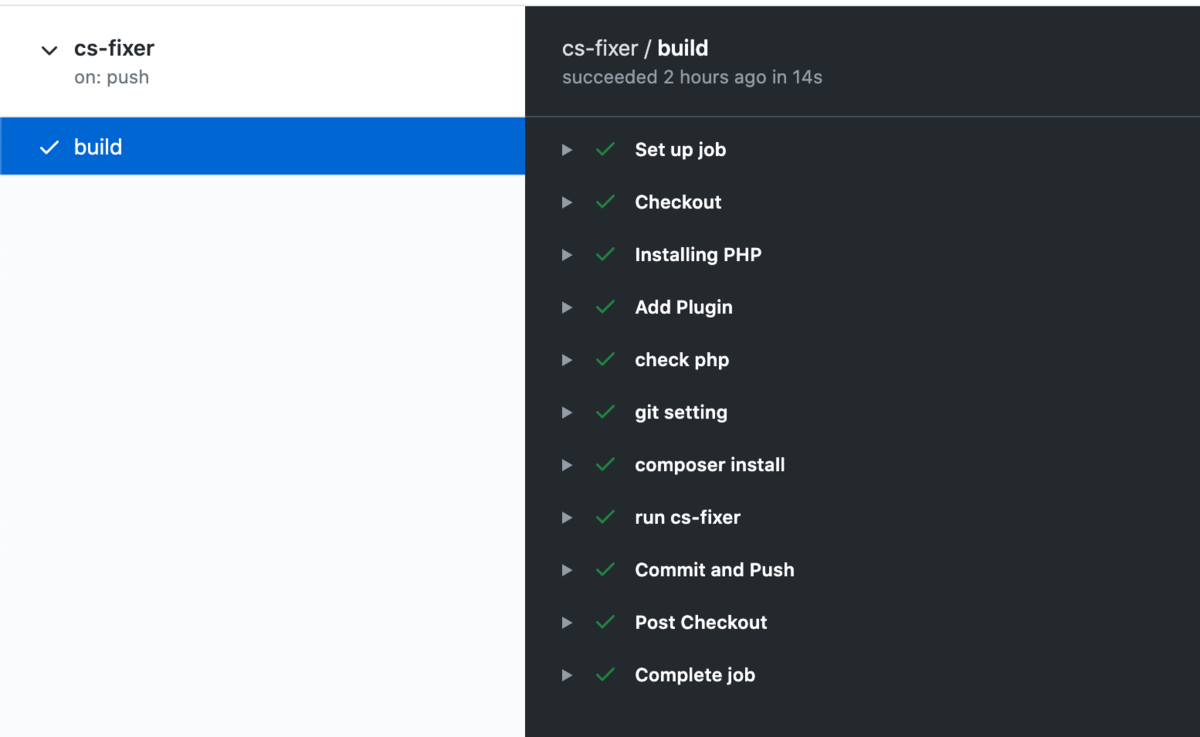
このようにすることで、自分の作業をプッシュ時に以下のようにGithub Actionsで実行してくれます。
さいごに
これで無事整形する必要があれば整形を行いcs-fixerというコミットメッセージでコミットしてくれるようになりましたね。
雑なコミットをしても勝手に自動でいい感じにしてくれるシステムの完成ですね!
